
Paid partnership withJohn Einar SandvandFounder, Theta Profits
For Theta Profits readers
Your real options P&L, synced from your broker.
Every spread, roll and assignment, organized into the strategies you actually traded. No spreadsheet.
Reader offer · $61 off
$139 for your first year
$200 $139 for year one, applied automatically at checkout.
11 days leftA launch price for Theta Profits readers. It ends Sunday, November 1 at 11:59 pm ET.
7 days free for new accounts, then $139 for your first year and $200/year after. Card required, not charged during the trial. 30-day money-back guarantee.

“You can't improve what you don't measure. For options traders, systematically tracking every trade is essential to understanding what actually works.”
Syncs with See sync details
 Alpaca
 E*Trade
 Fidelity
 Interactive Brokers
 Robinhood
 Schwab
 tastytrade
 Wealthsimple
 Webull
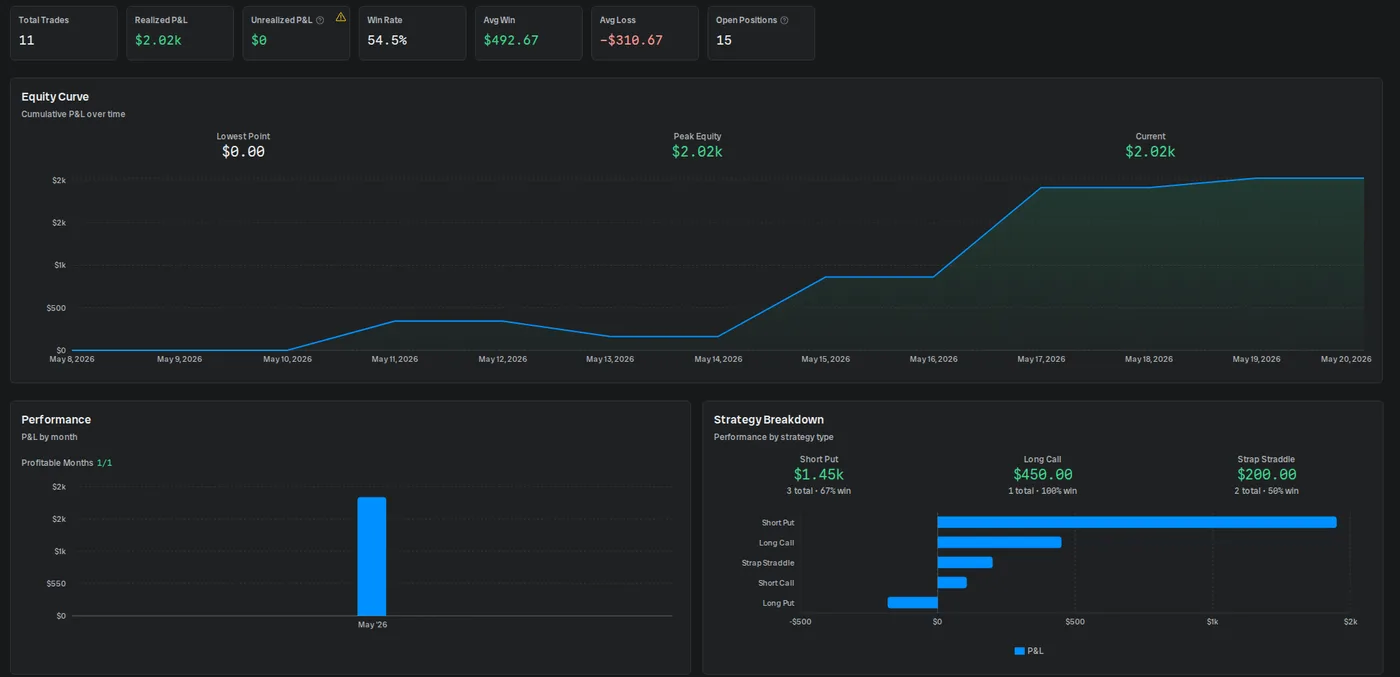
Your broker statement was not built for options
OptionsPro fixes that without asking you to type in a single trade.
- Your broker shows every leg as its own line, so one iron condor looks like four unrelated trades.
- An assignment turns into a share purchase you have to reconcile with the put you sold weeks ago.
- Your spreadsheet works until the day you forget to update it, and then it quietly stops being true.
- You know your account balance, but not which strategies are actually making you money.
Three steps to your first dashboard
Connect your broker, read-only
Pick your broker and sign in on SnapTrade's secure page. OptionsPro never sees your broker password.
Your trades sync and organize themselves
OptionsPro pulls in your history, groups the legs into strategies, and settles expirations and assignments on its own.
See what is working
Open the dashboard for your real P&L, win rate and equity curve, and find which strategies earn their keep.
Connects to the broker you already use
9 brokers sync automatically through SnapTrade, read-only. Don’t see yours? You can still add trades by hand.
 AlpacaFull account historyNew trades in minutes
 E*TradeHistory: Last 2 yearsNew trades in minutes
 FidelityHistory: Last 2 yearsUpdates once a day
 Interactive BrokersHistory: Last 2 yearsUpdates once a day
 RobinhoodFull account historyNew trades in minutes
 SchwabHistory: Last 2 yearsNew trades in minutes
 tastytradeFull account historyNew trades in minutes
 WealthsimpleHistory: Since April 2023New trades in minutes
 WebullHistory: Last 2 yearsNew trades in minutes
A read-only broker connection
- Read-only access. OptionsPro reads your accounts, positions and trade history. It cannot place trades or move money.
- You sign in to your broker on SnapTrade's secure connection page. OptionsPro never receives your broker password.
- SnapTrade, the brokerage connection provider, is SOC 2 Type II certified.
- Disconnect a broker at any time from the Brokerages page.
Strategies
Your legs, grouped into the trades you actually placed
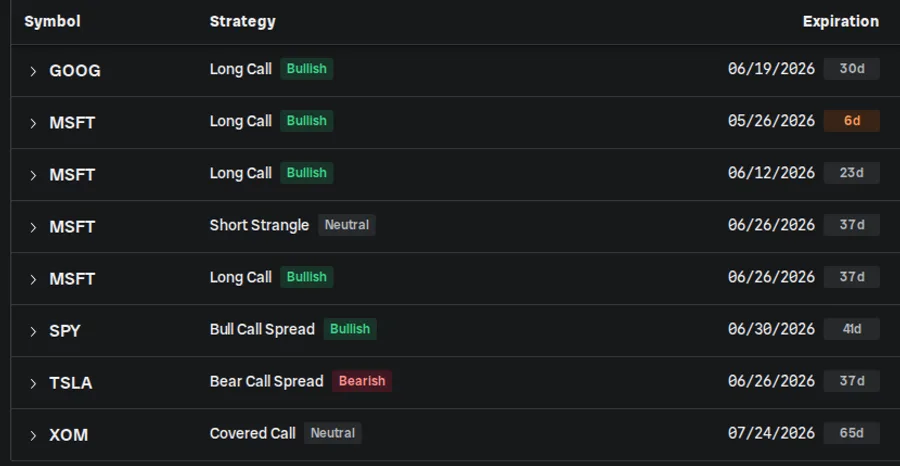
OptionsPro recognizes 50+ option structures and groups the legs for you on every sync, so your journal reads like your trading plan instead of a list of fills.
- Verticals, iron condors, butterflies, calendars, straddles and strangles
- Covered calls, collars and protective puts, with the shares included
- Each strategy tagged bullish, bearish or neutral, with days to expiration
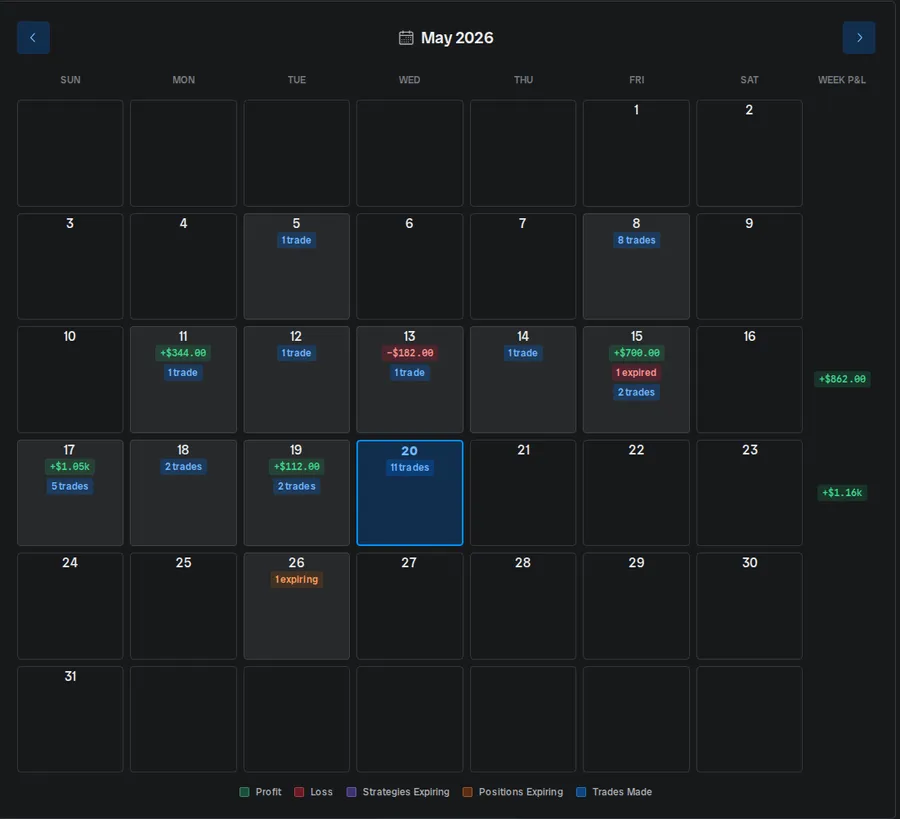
Calendar
Every day's P&L and every expiration, on one screen
A month-grid heatmap of what you made, what you traded and what is about to expire, with weekly totals down the side.
- Green and red days at a glance, with the dollar amount on each
- Upcoming expirations marked before they sneak up on you
- Tap any day for the trades behind the number
Risk and Insights
Find the leaks before they cost you
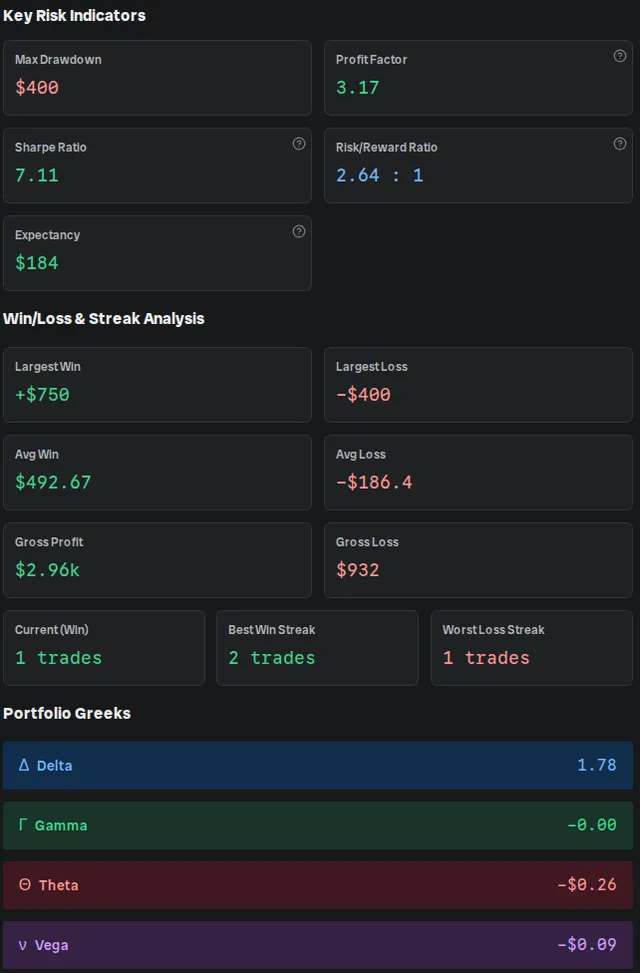
The numbers a serious trader tracks, calculated for you from your own history, plus an AI assistant you can ask about your trades in plain English.
- Profit factor, max drawdown, expectancy and risk/reward
- Largest win and loss, streaks, and gross profit and loss
- Portfolio Greeks across every open position
The options details generic journals get wrong
Expirations and assignments settle themselves
Expired contracts are settled from the underlying's closing price. An assigned short put books the share purchase at the strike, so your options and your shares tell the same story.
Rolls, with a second opinion
Roll at your broker and both halves sync on their own. Before you roll, the Rolling Repair Assistant scores candidate rolls by net credit, breakeven and Greeks. It never places a trade.
Which strategies earn their keep
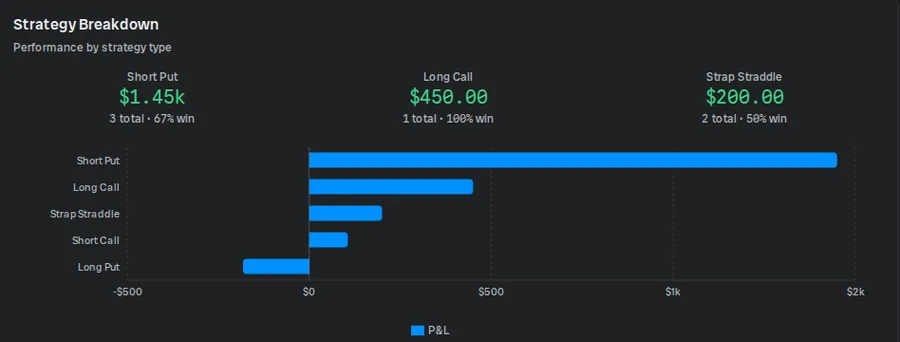
The dashboard breaks P&L and win rate down by strategy type, so you can see whether your short puts carry the account or your long calls drain it.
7 days free for new accounts, then $139 for your first year and $200/year after. Card required, not charged during the trial. 30-day money-back guarantee.
Spreadsheet, broker, or OptionsPro
| Feature | Spreadsheet | Broker | OptionsPro |
|---|---|---|---|
| Updates itself | No | Yes | Yes |
| Groups legs into strategies | By hand | Varies | 50+ structures |
| Handles expiration and assignment | By hand | Partly | Yes |
| P&L by strategy | If you build it | Rarely | Yes |
| Risk metrics and Greeks | If you build it | Some | Yes |
| All your brokers in one place | By hand | Only its own | Yes |

From Full Throttle Media, the team behind optionstrading.org
Why we built OptionsPro
We run optionstrading.org and its weekly options newsletter, and most journals we tried treated options as an afterthought next to stocks, futures or crypto. We built OptionsPro to make options journaling simpler: connect your broker, have your multi-leg trades organized for you, and review your performance by strategy.
Leon Moyer, Product Lead at OptionsPro
Everything in OptionsPro Pro
- Brokerage sync for every supported broker, as many accounts as you have
- Automatic detection of 50+ multi-leg strategies
- Dashboard with P&L, win rate, equity curve and strategy breakdown
- Calendar heatmap of daily P&L and expirations
- Risk and Insights: profit factor, drawdown, expectancy and portfolio Greeks
- AI assistant that answers questions about your own trades
- Rolling Repair Assistant for scoring candidate rolls
- Portfolios to separate accounts or trading styles
- Manual trade entry and the profit calculator
30-day money-back guarantee
Try it for a week. Then decide.
- 7 days free. You are not charged until the trial ends.
- Cancel online in Settings before then and you pay nothing.
- Changed your mind after paying? Email us within 30 days of your first payment for a full refund.
This page was made for readers of Theta Profits, in partnership with John Einar Sandvand. The reader price is only available through this page.
Questions readers ask
Is it safe to connect my brokerage?
Yes. The connection runs through SnapTrade, which is SOC 2 Type II certified. You sign in to your broker on SnapTrade's page, so OptionsPro never receives your password, and the connection is read-only: OptionsPro can see your accounts, positions and trades, but it cannot place trades or move money.
Which brokers are supported?
Alpaca, E*Trade, Fidelity, Interactive Brokers, Robinhood, Schwab, tastytrade, Wealthsimple, Webull. You can also add trades by hand, for example from a broker that is not on the list.
How far back does my history go?
It depends on the broker. Several sync your full history back to when the account was opened, and others go back a set window such as two years. The broker picker shows the history each one supports before you connect.
What happens after the free trial?
If you do nothing, your first year is billed at the reader price of $139 (normally $200) when the 7 days end. Renews at $200/year after the first year. Cancel anytime.
I've had an OptionsPro trial before. Can I still get this?
Yes, the reader price still applies. The free trial is one per account, so an account that already had one goes straight to checkout at $139 for the first year and is charged then, with the same 30-day money-back guarantee.
Do I need a card to start the trial?
Yes. Stripe, our payment provider, asks for a card to start the trial. You are not charged during the 7 days, and if you cancel before they end you are not charged at all.
How do I cancel?
Online, in a few clicks: open Settings in the app, choose Manage Billing, and cancel there. No email or phone call is needed.
Does it handle rolls, assignments and spreads?
Yes. Multi-leg positions are grouped into 50+ recognized strategies, expirations and assignments settle automatically, and when you roll at your broker both halves sync on their own. A roll is recorded as the close of one leg and the open of the next, which is how your broker reports it.
How quickly do new trades show up?
It depends on the broker. With most, a new fill appears within minutes. Fidelity and Interactive Brokers only release trades to connected apps once a day, so there it shows up the next day.
Does it give trade recommendations?
No. OptionsPro is a journal and analytics tool. It shows you what happened in your own account, and it never places trades or tells you what to buy.
Is there a money-back guarantee?
Yes. The first payment on a new Pro subscription - monthly or annual - is covered by a 30-day money-back guarantee, and the 30 days run from the date of that payment. If you start with the 7-day free trial, that first payment is the charge at the end of the trial rather than the day you signed up. Email support@optionspro.com or ask us in the app within 30 days of it and we'll refund it in full, no questions asked, and cancel the subscription. The guarantee covers that first payment, so it doesn't apply to renewals.
$139 for your first year
11 days leftA launch price for Theta Profits readers. It ends Sunday, November 1 at 11:59 pm ET.
7 days free for new accounts, then $139 for your first year and $200/year after. Card required, not charged during the trial. 30-day money-back guarantee.