THE TRADE IS ONLY HALF THE STORY
Your options.
Your decisions.
A clearer review.
An options trading journal that puts the contract, the execution and your thinking in the same place. Build a record you can actually learn from.
Pro is $16.67/month billed yearly after the 7-day trial. Card required, no charge until the trial ends. Cancel anytime. Or start free
Backed by a 30-day money-back guarantee on your first payment.
Syncs read-only with the brokers you already use
 Alpaca
 E*Trade
 Fidelity
 Interactive Brokers
 Robinhood
 Schwab
 tastytrade
 Wealthsimple
 Webull
01 / FROM EXECUTION TO UNDERSTANDING
More than a list
of wins and losses.
A closing number tells you what happened. A useful journal helps you retrace the decisions that got you there.
Bring the record together
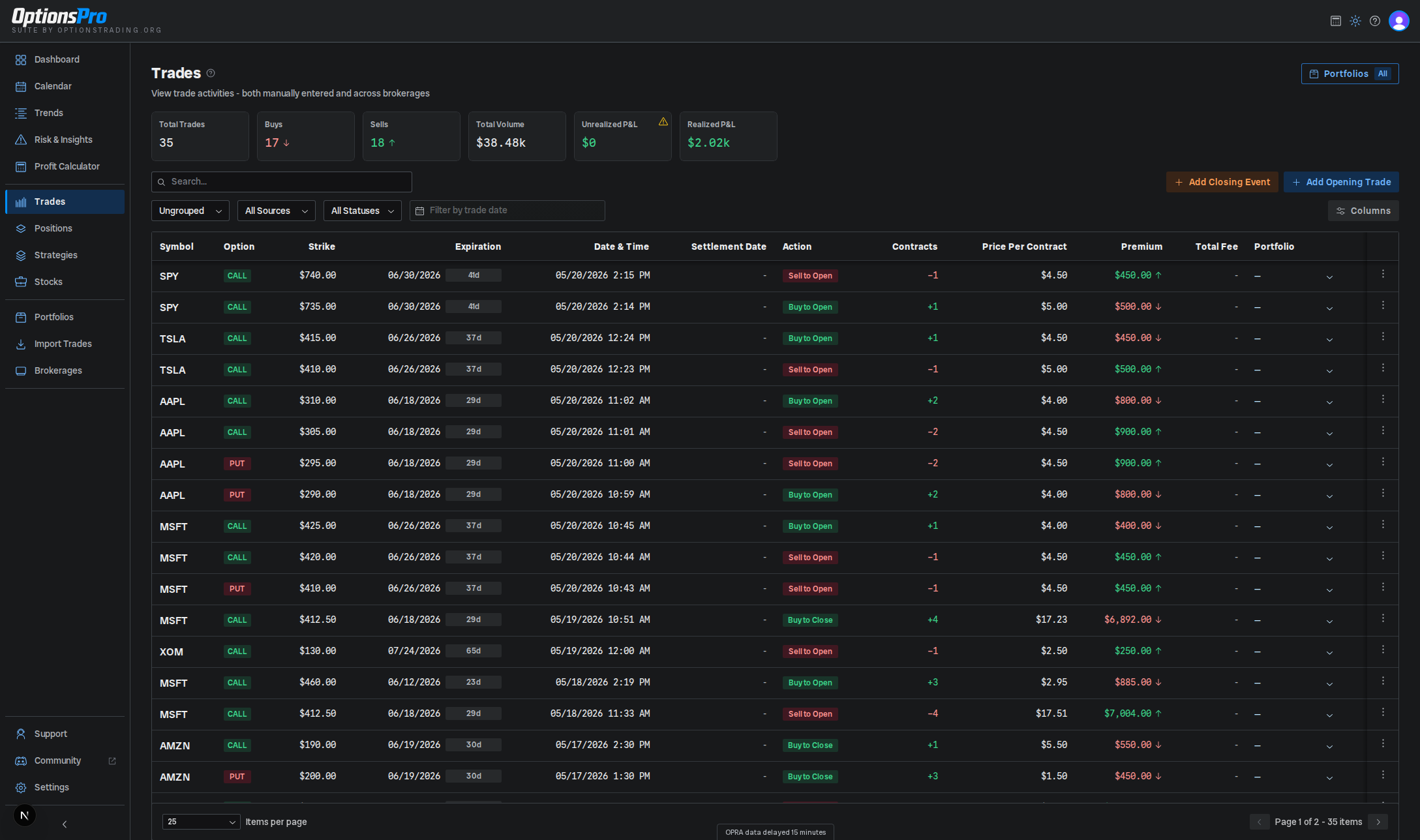
Add trades manually or import a file. Review extracted contracts, quantities and actions before you commit them.
See the import workflowKeep the reasoning close
Open a trade’s details and record the setup, intended exit and what changed. Free-form notes stay with that execution.
Explore trade notesReview with context
Use Positions for paired opening and closing trades. Use the Calendar to revisit activity, P&L and expiration dates.
Understand position results02 / MAKE THE REVIEW SPECIFIC
Remember the why.
Question the result.
Options have more moving parts than a ticker and an entry price. Preserve the contract details and your plan, then compare them with the actual exit.
For a multi-leg position, check each leg’s action, quantity, strike and expiration before drawing conclusions from the combined result. Strategy grouping is part of the Pro plan.
See what a trade record includesA losing trade. A useful record.
Fictional educational example with assumed fills and fees. Not product UI, a customer record or performance evidence. XYZ is a placeholder symbol.
- Contract
- 1 XYZ $50 put, expiring November 20, 2026. Assumed multiplier: 100 shares.
- Entry thesis
- October 5: expected support near $51 to hold. Set aside cash to buy 100 shares at $50 if assigned.
- Exit rule
- Close if XYZ breaks $51. October 9: support broke; bought back the same contract instead of extending the trade.
- Fills
- Sold to open at $1.20 × 100 = $120 credit. Bought to close at $1.55 × 100 = $155 debit. No open contracts remain.
- Fees
- Assumed $0.65 on entry + $0.65 on exit = $1.30 total. These are example costs, not a broker’s fee schedule.
Realized loss after the assumed fees.
The support thesis failed, but the planned exit was followed. Next time, document the evidence for support and budget both sides’ fees before entry. One trade does not establish an edge.
03 / KNOW WHAT THE NUMBER MEANS
Ask better questions
of every result.
Premium collected is one part of the record. Closing costs, fees and any remaining exposure belong in the review too.
Was that premium or profit?
A credit at entry is not the final result. Look at opening and closing activity together in Positions, with realized and unrealized P&L kept distinct.
Did the fees come through?
Check effective fees in the Trades table. Use fee overrides when needed, then reconcile the result with your broker’s statement.
How fee overrides workIs the history complete?
A missing opening fill can change the story. Check imported history, expiration activity and quantities before treating a result as settled.
Understand data quality04 / START WITH YOUR OWN TRADES
Try Pro free.
Or start with the basics.
Pro connects your broker, groups strategies and adds the analytics. Try it free for 7 days, or keep a manual journal on the free plan.
Compare plan details$16.67/month billed yearly
or $20 billed monthly
Connect. Group. Analyze.
- Supported brokerage connections
- Strategy grouping and portfolios
- Trends, Risk & Insights and unlimited AI imports
Broker support, available history and sync timing vary; connections are read-only.
Start 7-Day Free TrialSee Pro pricing$0/month
Free forever, no card
Your review starts here
- Manual trade entry and trade notes
- Dashboard, Calendar, Trades and Positions
- 500 AI-imported trades total, lifetime
The 500-trade allowance applies to AI imports, not manual journal entries.
Start freeA FEW PRACTICAL DETAILS
Before you start.
Clear expectations make for a better first review.
Is the options trading journal free?
Yes. The free plan includes manual entry, trade notes and core views including Trades, Positions and Calendar. It also includes up to 500 AI-imported trades total over the lifetime of the account. That is an import allowance, not a cap on manual entries. Review plan details.
Can I start without connecting a broker?
Yes. Add trades manually or use the AI import wizard with CSV, Excel, PDF, image or text files. Review extracted rows and any flagged values before importing. Brokerage connections require the Pro plan. Read the import guide.
Can I review spreads and multi-leg trades?
You can record the individual executions and inspect positions. Automatic strategy detection, strategy grouping and the Strategies page require the Pro plan. Check the quantities, expiration dates and grouping against your actual trade before reviewing a combined result. Explore strategies.
Are fees included in the review?
OptionsPro uses fees in P&L calculations and supports overrides when reported fees need adjustment. Check the effective fee in the Trades table; the Trade Details modal does not show every current override. Reconcile with your broker before relying on the result. Read about fee overrides.
Will every broker sync instantly?
No. Available history and delivery speed depend on the broker. Fidelity and Interactive Brokers typically report new trades the next business day; Interactive Brokers can take 1 to 2 business days for the initial data. OptionsPro connections are read-only and cannot place trades. Check connection details.
YOUR NEXT TRADE DESERVES A BETTER RECORD
Build a habit of looking back.
Bring in a few trades. Add the reasoning. Make your next review more useful.
Start 7-Day Free TrialPro is $16.67/month billed yearly after the 7-day trial. Card required, no charge until the trial ends. Cancel anytime. Or start free
Backed by a 30-day money-back guarantee on your first payment.