Strategies
Automatic detection of multi-leg structures across your trades and positions.
OptionsPro groups individual legs into named strategies so your journal reads like your trading plan, not a list of executions. Detection runs on every sync and re-runs whenever a trade is added or closed.
Strategies is a Pro-tier feature. See Subscription.
What gets detected
The detector recognizes a wide library of structures, including:
- Single-leg - Long Call, Long Put, Short Call, Short Put.
- Verticals - Bull Call, Bear Call, Bull Put, Bear Put.
- Ratio spreads and backspreads - Bull/Bear Ratio Spreads, Short Bull/Bear Ratio Spreads, Call/Put Ratio Spreads, Call/Put Ratio Backspreads.
- Ladder spreads - Bull Call Ladder, Bear Put Ladder.
- Butterflies and condors - Butterfly, Bull/Bear Butterfly, Iron Butterfly, Reverse Iron Butterfly, Condor, Bull Condor, Iron Condor, Reverse Iron Condor, Short Butterfly, Short Condor.
- Albatrosses - Albatross, Iron Albatross, Reverse Iron Albatross, Short Albatross.
- Calendars - Calendar Call/Put Spreads, Short Calendar Call/Put Spreads, Calendar Straddle, Calendar Strangle.
- Volatility plays - Long/Short Straddle, Long/Short Strangle, Long/Short Gut, Strip Straddle, Strap Straddle, Strip Strangle, Strap Strangle.
- Stock-and-options combinations - Covered Call, Covered Put, Covered Call Collar, Collar, Protective Put (Married Put), Protective Call.
Anything that doesn't match a known structure - including diagonals (different strike and different expiration) - is recorded as a Custom Strategy so its legs still aggregate together.
You can also group legs yourself when the detector's answer isn't the one you traded - see Custom Strategy Grouping.
Strategies page
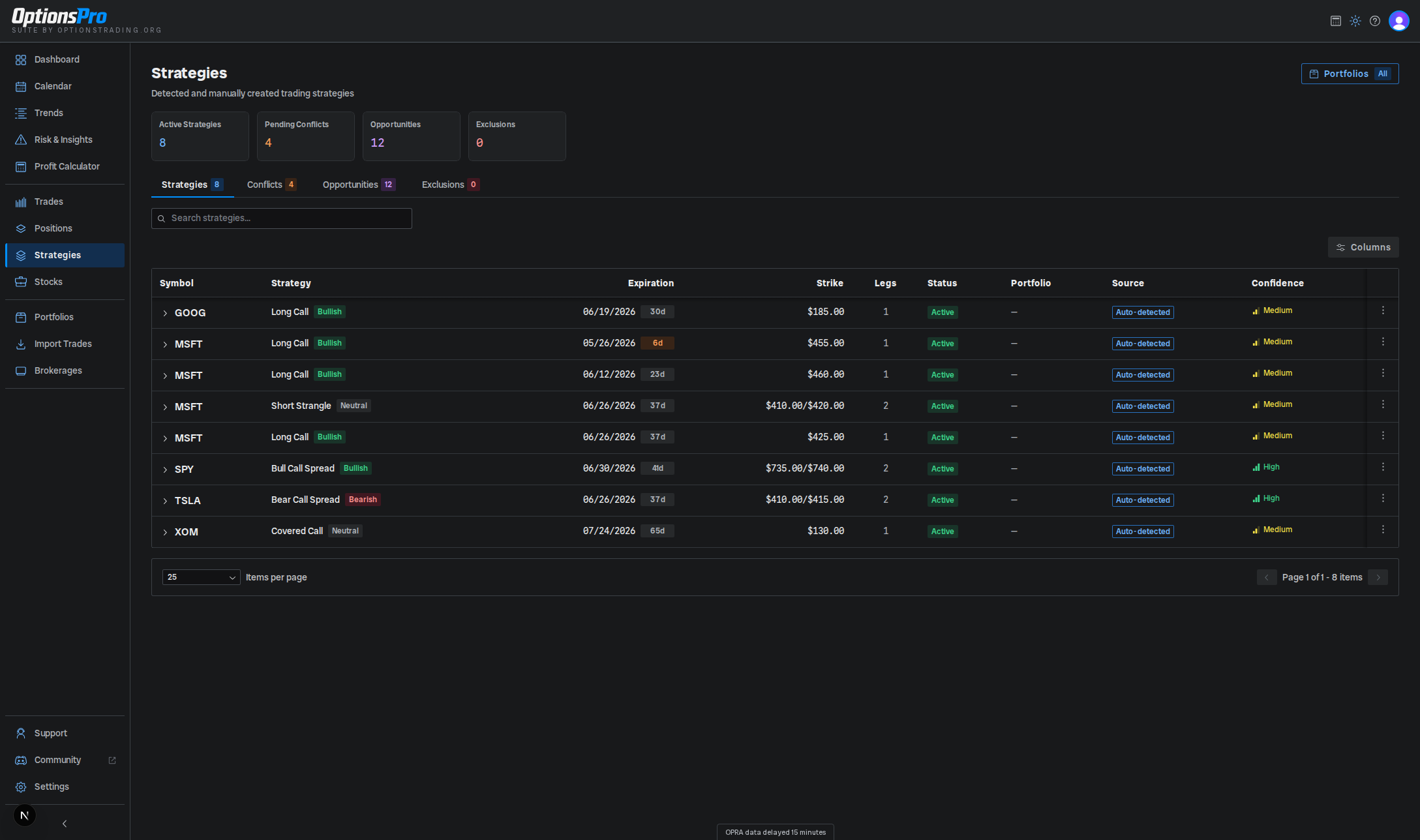
The page is split into four tabs: Strategies, Conflicts, Opportunities, and Exclusions. Summary cards above the tabs show the number of active strategies, the Closed Win Rate, and counts of pending conflicts, opportunities, and exclusions.
The Strategies tab lists every detected strategy with these columns:
- Symbol - underlying ticker.
- Strategy - the detected structure with a market-outlook badge (bullish / bearish / neutral / volatile).
- Expiration - earliest expiration, or a range when the structure spans multiple expirations (e.g. calendars). A colored badge shows days remaining (orange within 7 days, red if expired).
- Strike - strike(s) involved, separated by
/when there is more than one. - Legs - count of contract legs.
- Status -
Active,Closed, orPartial. - Realized P&L - realized P&L across the strategy's option legs, or
-while nothing has been realized yet. For a covered call or collar whose shares were called or put away, an Incl. shares line underneath adds the gain or loss on the shares. The Dashboard and win rate count the option P&L only. - Unrealized P&L - current paper P&L across the open legs of an
ActiveorPartialstrategy. It's shown only once every open leg has a mark, since a spread's P&L without one of its legs describes a different position, so a-means a leg is still waiting on market data. A spinner means prices are still loading.Closedstrategies show-. - Result -
Win,Loss, orBreakevenonce every leg has closed, scored on the combined P&L of the legs the same way the Dashboard's win rate scores it. Until then the cell shows-; hover it to see what it's waiting on - one of the strategy's own legs, or a related open leg in the same account and underlying (for example the long leg of a spread whose short you've bought back). - Closed - the day the last leg closed, once the result is decided.
- Portfolio - portfolio assignment for the underlying positions, or a count badge when legs span multiple portfolios.
- Source -
Auto-detected,User-selected(you picked the structure when entering the trade), orManual(you grouped it yourself, from the Conflicts tab or the grouping modal). Manual groups can also carry Locked and Edited badges. - Confidence - Low / Medium / High indicator for how well the detected pattern matched, plus a suggested fills badge when new legs may belong to a group you customized.
Click a row to expand it and see each leg's direction, type, strike, expiration, quantity, average cost, cost basis, and realized P&L, plus the strategy's Greeks while any leg is open. The row's actions menu lets you Reject an auto-detected or user-selected strategy (which adds an entry to the Exclusions tab so it won't be detected again), Delete a manually resolved strategy, Break up a group into simpler ones, or Share a card of the structure and its P&L (see Sharing).
The page also has a search box; sort by clicking column headers. A Minimum Opening Legs filter controls how simple a structure has to be before it's listed - set it to 1 to include single-leg strategies, or raise it to hide them. The shares in a stock strategy count as a leg, so a covered call (100 shares plus one short call) has 2 legs and is listed at the default.
Closed Win Rate
The Closed Win Rate card is the share of closed strategies in the table
that finished with a profit, with the count behind it (e.g. 12 of 18). A
breakeven counts as closed but not as a win, and the card shows - until a
strategy in the table has a result. It follows the table's filters - the
portfolio filter, the search box, and Minimum Opening Legs - and isn't
limited to a date range, so it can differ from the Dashboard's
win rate, which counts every
closed trade in the selected period. Raising Minimum Opening Legs to 2, for
example, leaves single-leg trades out of it.
Greeks
Expanding an Active or Partial strategy shows a Greeks (open option
legs) block under its legs: Delta, Gamma, Theta (dollars per day), and Vega
(dollars per volatility point), summed across the strategy's open option
legs. Each leg's Greeks are multiplied by its signed quantity and by 100, so a
short leg subtracts and the totals read as share-equivalents for Delta and
Gamma and as dollars for Theta and Vega. The
Portfolio Greeks card on Risk & Insights is
not scaled by 100.
- If any open leg has no current market data, the block reads Greeks unavailable and says how many legs are missing it, rather than totaling part of the strategy.
- For a strategy that involves shares (a covered call or collar), an Excludes shares note is shown: the totals cover the option legs only.
- A
Closedstrategy has no Greeks block.
Roll chains
(if enabled for your org) When you close a strategy and reopen the same structure, OptionsPro links the two into a roll chain so the whole lifecycle reads as one trade rather than a string of unrelated ones.
Two strategies are linked when all of these hold:
- The earlier one is fully closed, and closed by trades. A leg that expired (worthless or in the money) or was assigned ends the chain - reopening after that is a new trade, not a roll.
- The later one was opened on the close day or up to 3 calendar days after it, so a Friday close and a Monday reopen still counts.
- Both are on the same underlying, in the same account, and are the same structure - same strategy type and the same set of leg directions and option types.
- Something actually moved: reopening the identical contracts is a re-entry, not a roll, and the later expiration can't be earlier than the one you closed. A later expiration, different strikes, or both all qualify.
Each strategy has at most one predecessor and one successor, so a chain is a straight line. Where several reopens compete for the same close, the closest one in time wins.
Expanding a strategy that belongs to a chain adds a Roll chain block under its legs, with the chain's length and roll count in the heading:
- The timeline - every strategy in the chain in order, each with its strikes, expiration and contract count, the day it opened, whether it is open or the day it closed, and its own realized P&L. The row you expanded is shown in bold.
- Lifecycle realized - realized P&L summed across every strategy in the chain.
- Open unrealized - paper P&L on the chain's open strategy, or
-once the chain is fully closed. A spinner means quotes are still loading. - Lifecycle total - the two added together: what the whole roll sequence is worth so far.
- Rolling net credit - premium collected minus premium paid across every roll, including the legs still open, with a per-contract figure beside it where the contract counts make one meaningful. Opening fees on legs that are still open are not netted into it.
Linking is for display only. It doesn't merge the strategies, change their individual P&L, or affect the win rate - each strategy in the chain is still scored on its own. If you'd rather have a roll counted as a single trade, group the positions yourself with Custom Strategy Grouping.
Selecting rows
Row checkboxes appear when custom strategy grouping is enabled for your organization. Selecting two or more rows from the same underlying reveals a Group into Strategy action above the table - the only bulk action offered on this page. See Custom Strategy Grouping and Bulk Actions.
Conflicts, Opportunities, and Exclusions
- Conflicts - positions that fit more than one valid structure. OptionsPro shows each candidate with a percent-match badge so you can pick the one you intended.
- Opportunities - partial matches: positions that would form a known structure if you added one or two more legs. Each card lists the missing legs.
- Exclusions - strategies you've rejected. They won't be detected again until you remove the exclusion from this tab.
Why a leg might not group
If a leg you expect to be part of a spread shows as standalone, the most common causes are:
- The positions match more than one structure and are sitting on the Conflicts tab waiting for you to choose.
- The structure is incomplete and is showing on the Opportunities tab instead.
- You (or someone in your org) previously rejected the structure - check the Exclusions tab.
- The leg is already part of a group you created or edited yourself. Those groups are locked, so auto-detection won't pull their legs into a different structure - see Custom Strategy Grouping.
- A portfolio filter is active and one of the legs is in a portfolio that's currently filtered out.
- The trade is still being enriched - the P&L refining indicator on the Trades page will be showing.
- The legs are closed and don't pair. Closed legs pair within one account when they were opened on the same day, or, failing that, when they share an expiration. A calendar or diagonal whose legs were opened on different days, or whose opening trades are older than your synced history, shows as separate trades. Rolls count as separate trades. Each piece gets its own Result and counts on its own toward the win rate; to score them as one trade, group them yourself.
- The option legs are closed and the structure involved shares. Closed option legs pair only with other option legs, not with the shares you hold, so a covered call you bought back shows as a short call and a closed collar is labeled from its two option legs. A covered call whose shares were called away still shows as a covered call.
Detection re-runs automatically. If a structure doesn't appear after a minute, reach out to support.
Wheel Cost Basis
Adjusted cost basis for shares acquired by assignment, netting the option premium you have already collected against what the shares cost.
Custom Strategy Grouping
Group legs into a strategy yourself, break a strategy up, add a leg to an existing group, and see what auto-detection will and won't touch afterward.