Manual Trade Entry
Add trades that aren't in your brokerage - historical fills, off-platform trades, or paper-trading scenarios.
Not every trade is in a connected brokerage. You may have an old account that's since closed, a broker we don't support yet, or trades from a paper-trading scenario you want to include in the journal. Manual entry covers all of these.
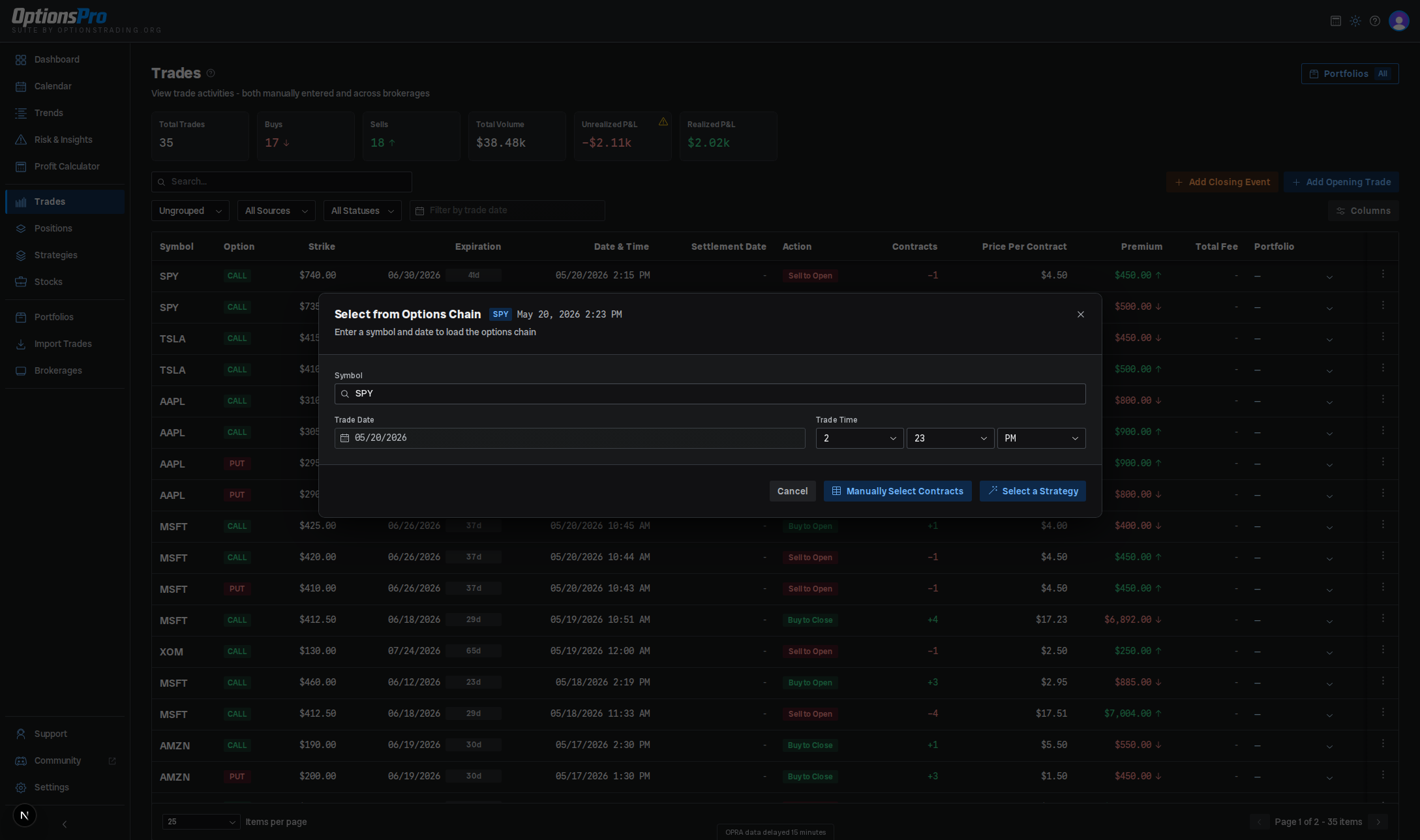
Opening the form
The Trades page has two header buttons:
- Add Trade - opens the Options Chain Selector to record a new opening position (Buy to Open / Sell to Open). Its dropdown caret lists the other entry methods enabled for your account. Quick Entry (type strikes and fills) records a ticket without loading a chain - see Quick Entry below. Manually Enter Trade covers contracts that can't be selected from a chain at all - see Unverified trades below.
- Close Position - opens the close-position modal for an existing manual open leg. See Closing Trades for that flow.
The selector also detects when one of your selected contracts would close an existing open position and prompts you to confirm those as BTC/STC instead of new openers.
How the flow works
- Enter the underlying Symbol, Trade Date (defaults to today's date in your own timezone), and Trade Time, then choose Select Contracts or Select a Strategy.
- The chain loads. In manual mode, click contracts in the split call/put table to add as many legs as you need. In strategy mode, pick a structure (vertical, iron condor, straddle, etc.) and the selector auto-fills the legs around the at-the-money strike.
- Click Finalize Selection to move to the preview.
- In the preview, adjust each leg's Action (Buy/Long or Sell/Short), # of Contracts, Cost Per Share (per-share premium, prefilled from the chain's Est. Value for that contract), and optional Total Fee, then click Confirm Selection. If any legs match an existing open position you'll get a closing-trades confirmation step before the trades are written.
The chain shows one Est. Value per contract rather than a bid and an ask, and buying and selling prefill the same number, so the prefilled premium is a starting point rather than a fill. Type the price you actually traded at - that is what the journal records. See What a price is.
A leg's # of Contracts has to be a whole number of at least 1. Type a 0, a decimal or nothing at all and the field keeps what you typed, turns red with a message under the table, and holds Confirm Selection until you fix it - rather than quietly rounding the leg up to one contract behind your back.
Strategy detection runs after the trade is saved - if the legs match a known structure they get grouped on the Strategies page.
Quick Entry
Use Quick Entry when you already know what you traded and don't want to wait for a chain to load. It's a typed ticket: strikes and fill prices go in by hand, nothing is picked off the chain. The trades it writes go through the same path as a chain selection, so market data, Greeks, strategy detection, and P&L attach to them like any other trade.
Open it from the Add Trade dropdown, or from the Type strikes and prices with Quick Entry link on the chain selector.
Quick Entry appears only when it is enabled for your account. Without it, the chain selector covers the same ground.
Filling in the ticket
- Enter the Underlying Symbol, Expiration Date, Trade Date, and Trade Time. For an index with both monthly and weekly contracts, a line under the symbol names the root the trade will be stored under (for example SPX versus SPXW), so you can correct it before saving.
- Pick a Structure: Iron Butterfly or Iron Condor builds all four legs from a couple of strikes; Custom takes any set of legs you add. Switching a template to Custom keeps the legs it built, so it's a fine starting point for a structure the templates don't cover.
- Set Opening or Closing. On Closing, every leg is recorded as a closing trade against your open position in that contract, and the ticket says so.
- For a template, choose Short (credit) or Long (debit) and fill in its strikes - Center Strike for a butterfly, Short Put Strike and Short Call Strike for a condor - plus the Wing Width and the number of Contracts. The legs rebuild as you type.
- For Custom, add each leg's side, call or put, contract count, strike, and fill price. Fill prices are per-share premiums, as in the chain preview.
- Optionally enter Total Fees for the whole ticket. It's split across the legs for you.
- Add Trade saves and closes. Save & Add Another saves and reopens the ticket with the symbol, dates, structure, direction, and size carried over and the strikes, fills, and fees cleared, cursor back on the first strike - the fast path for a run of similar tickets.
A running Net credit or Net debit per share sits above the buttons with the ticket's dollar total beside it, so you can check it against your broker's confirmation before saving.
What it checks
Quick Entry validates the ticket rather than the market: it won't save without a symbol, an expiration, at least one leg, and a valid strike, fill price, and whole contract count on every leg, and an iron condor's short put has to sit below its short call. Anything wrong is listed in red at the bottom of the form.
It does not check the contract against the options chain, so where a real trade could still look odd it warns rather than blocks: an expiration before the trade date gets an amber note that the contracts had already expired when they were traded.
Unverified trades
Some trades can't be picked off a chain at all: a broker we don't support, a contract that no longer exists, a ticker that has since been delisted, or a fill our market-data provider simply has no record of. Choose Manually Enter Trade from the Add Trade dropdown and type the trade in directly.
Nothing you enter has to match the options chain, so you can record a trade even when we can't corroborate any part of it. Saving is never blocked on finding the contract. The form still tells you what each choice costs you before you save - an expired contract, a zero premium, a closing trade with no matching open position.
Trades entered this way are marked Unverified on their row and counted in the notice on every P&L surface. Imported trades get the same badge, for the same reason, when Trade Import can't match their contract on the chain. Concretely:
- Realized P&L, fees, trade counts, win rate, and every analytics breakdown include them exactly like any other trade.
- Unrealized P&L, Greeks, and risk metrics need a live market quote, so they stay empty for as long as we can't match the contract to real market data. If the contract is real and still trading, we keep retrying it on every market-data refresh, so marks start flowing on their own with no further action from you. A contract that has already expired is not retried - it is settled at expiration instead of ever getting a live mark.
Editing trade details
Every trade row - broker-synced, imported, hand-entered, or a settlement row - has Edit Trade Details in its action menu. It opens the same form pre-filled with the trade's current values.
Saving stores an override rather than editing the trade. The original record is kept untouched and your values are used everywhere instead: positions, realized and unrealized P&L, analytics, the calendar, and the dashboard. That's what makes the feature safe for broker-synced trades - the next sync would overwrite a direct edit, but it leaves your override alone. Overridden rows are marked Edited and list what changed; Restore Original in the same form drops the override.
An override that repoints a trade at a different contract (a different symbol, strike, expiration, or call/put) also marks the row unverified, since we have no evidence the new contract is one we ever validated.
Fees are overridden separately - use Override Fee in the same menu (see Fee overrides).
Deleting
To remove a trade entirely, use Delete Trade in the row's action menu. Broker-sourced trades can never be deleted - doing so would break position reconciliation - so correct those with Edit Trade Details instead.
Gotchas
- Manual trades have no
brokerageIdoraccountIdand aren't tied to a brokerage account. Unrealized P&L still tracks live marks from the options data feed, but there's no broker reconciliation to fall back on. - Portfolio assignment isn't part of the entry form - assign a manual trade to a portfolio later via the inline Portfolio column on the trades table.
- Trades created here are tagged
source: "manual", which is what makes them deletable later. Broker-sourced trades share the same row actions but can't be deleted.